
Procedure
1. Enter each of basic information items.
(1) English store name*
This is used for data transactions with the external system.
(2) Store name*
Enter the store name to be displayed on the site in the respective language.

(3) Base currency*
This changes the base currency for the entire shop.
* To edit the base currency, contact Support.

(4) Base country(For details)
Select the base country. "Ship in own country/domestically", "Pay in own country/domestically" and "Price in own country/domestically" are applied to the country selected as the base country.

(5) Maximum weight of orders
Determine how to respond when the total weight of the customer's ordered products is heavier than the shipping weight of freight that can be handled at a single time.

(6) Calculate shipping fee in Japan regardless of number of items
When "Calculate" is selected, the "Calculate shipping fee when only 1 item is purchased" product specification is ignored, and the shipping fee is calculated for freight addressed to within Japan.

(7) Settlement URL expiration date
You can edit the expiration date of the settlement screen URL that is issued when placing an order/requesting settlement again.

(8) Homepage URL
Enter only when the top page is to be set to an external URL.

(9) Return URL after order
Enter this after order completion when wishing to display pages other than the shop's top page.

(10) Copyright
This is the copyright displayed in the page footer.

(11) Top page information
This is displayed in the (Notices) section of the top page.

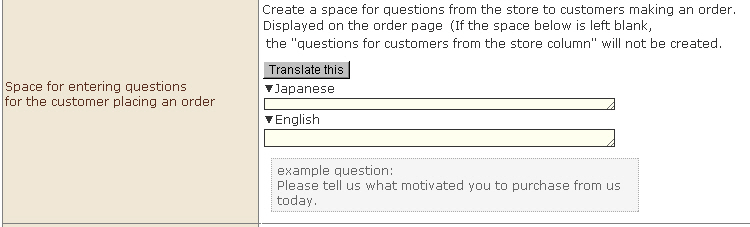
(12) Input field for generating questions to the customer
Create an entry field for the store to post questions to the customer. This is displayed on the Order screen. Use this for questionnaires, etc.
(When nothing is input, "Entry filed for the store to post questions to the customer" is not created.) )
(13) Google Shopping Feed Utility
XML feed for Google Shopping is automatically output once a day. Use this when registering products to Google Shopping.

(14) CDN Cache
Use this when experiencing difficulty making changes such as updated images, etc. due to enabling of the CDN function.
Cached content can be forcibly cleared.

(15) Store description
This is output to the Google Shopping feed as the store description.

(16) Type of translation delivery notice
Use this when using the YAQS translation function. Select the send frequency of delivery notice e-mails when requesting translation.

(17) Shop information for translators
Use this when using the YAQS translation function. Enter the store description for translators, if available. Entry is optional.

(18) Reference URL for translators
Use this when using the YAQS translation function. Enter this as a description field for store information for translators. Entry is optional.

(19) Other information
Use this when using the YAQS translation function. Enter reference information for translators, if available. Entry is optional.

(20) favicon
favicons used as browser icons and favorite marks can be registered.

(21) Site map
A site map can be registered to the search engine.

(22) Support Information Contact E-mail Address
Enter the e-mail address for send support-related information.

(23) Conversion tag
Select "Do not display" and "Display" for the conversion tag.

(24) Lot buying discount function
Volume discounts can be set. To use this function, select this checkbox.

(25) Sale function
Sale price and sale date/time settings can be used. To use this function, select this checkbox.

(26) Display function of products using ajax
This function allows you to get product information and inventory information, that can be used with the content management function, in real time. To post products in content in "content management," select this checkbox.

(27) Auto-interpolation function for batch registration of products' SKU
When batch registering products' SKU, SKUs without any combinations are interpolated by status that cannot be ordered to prevent erroneous ordering.

(28) Adjustment function for delivery method options
This setting automatically hides shipping methods that are not available for countries registered by the user as delivery destinations at "Select delivery method" at order input 2.

※ When this function is not used, the "Select shipping method" display changes (as described below), depending on whether there is a delivery destination country ID in the shipping country information.
1) When there is a delivery destination country ID in the shipping country information:
"Delivery method" that includes the shipping country of the delivery destination is displayed.
2) When there is no delivery destination country ID in the shipping country information:
"Shipping method" is displayed when only the search conditions "Outside Japan" and "All OK" are entered.
(The orderer manually selects the shipping area that matches the delivery destination.)
(29) Age verification function
Age verification can be set by individual store. When "use" is selectedt, enter the age to be set as the standard. When this is entered, be sure to set an entry field for birthdays at order input 1.

(30) Next-engine inventory-info cooperation
Set this to use next-engine inventory-info cooperation.

(31) Shop authentication (For details)
When this function is used, you will be prompted to enter your ID and password when you access an online shop.

(32) IP Restriction (For details)
You can apply IP restrictions so that online shops can be accessed by only permitted IP addresses.
※ Be sure to use this when related personnel have a fixed IP address. If they do not have a fixed IP address, use "Shop authentication".

2. Click the [Save] button. This saves the details you have entered.