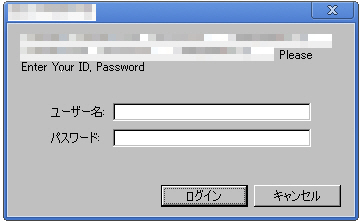
When this function is enabled, you will be prompted to enter your ID and password when you access the shop, and the store will not be displayed until the correct ID and password are entered. Use this function, for example, to set sites for use limited to only related personnel.
When this function is enabled, you will be prompted to enter the ID and password twice in SSL screens and non-SSL screens.
Procedure
1. Change the "Shop authentication" radio button to "use".
2. Input items for setting shop authentication will be displayed.

(1) Enter the ID and password for browsing shops.
(2) Set the period during which you will be prompted to enter your ID and password.
When the start date (left) is set to February 8, this authentication function will be enabled at 0 a.m. of February 8 (Japan Time).
When the end date (right) is set to February 8, this authentication function will be canceled at 0 a.m. of February 9 (Japan Time).
To validate this function immediately, enter a past date for the start date (left).
3. When shop authentication is enabled, you will be prompted to enter your ID and password as follows when you click a shop URL:
The shop will be displayed when you log in using the login ID and password that was set at (1) in step 2.