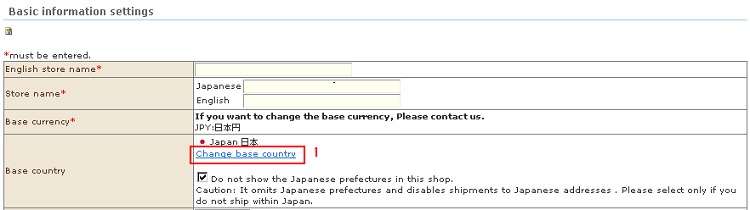
You can change the country where distribution bases, etc. are actually located as desired.
1. Click the "Change base country" field from the "Base country" field in the Basic Information Settings.
2. The "Change base country" screen is displayed.
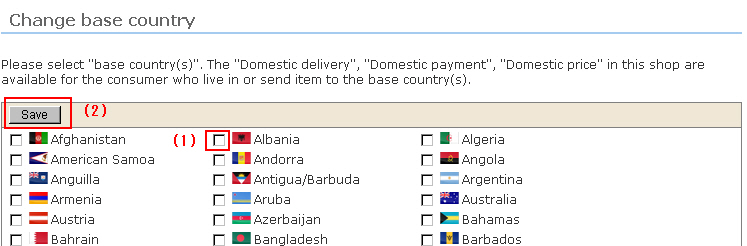
(1) Select the checkbox of the country you want to set as the base country. (Two or more checkboxes can be set.) "Ship in own country/domestically", "Pay in own country/domestically" and "Price in own country/domestically" are applied to the country selected as the base country.
(2) Click the [Save] button.
The country currently selected as the base country will be displayed in red in the "Change base country" screen.
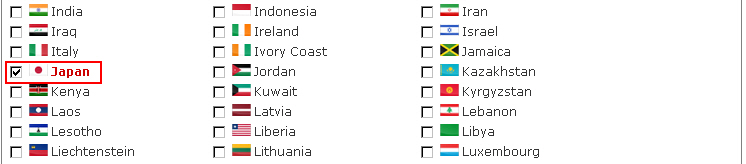
In the list screen, only the country selected as the base country will be displayed.
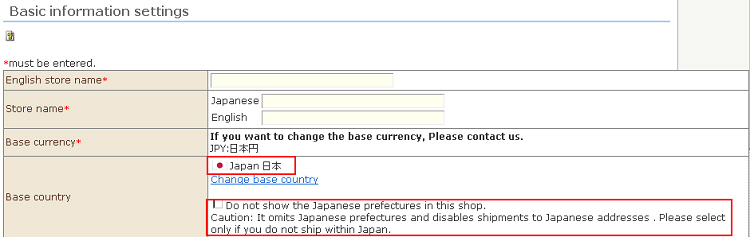
***Option available only when "Japan" is set as the base country***
"Omit Japanese prefectures for this shop" checkbox
With this function, all delivery destination prefectures are automatically regarded as "99: Overseas" to free the customer from the trouble of entering the destination when delivery is not to be performed in Japan at stores whose base country is set as Japan.
* Note: Japan's prefectures will be omitted and delivery inside Japan will no longer be possible. Select only stores where delivery in Japan will not be performed.