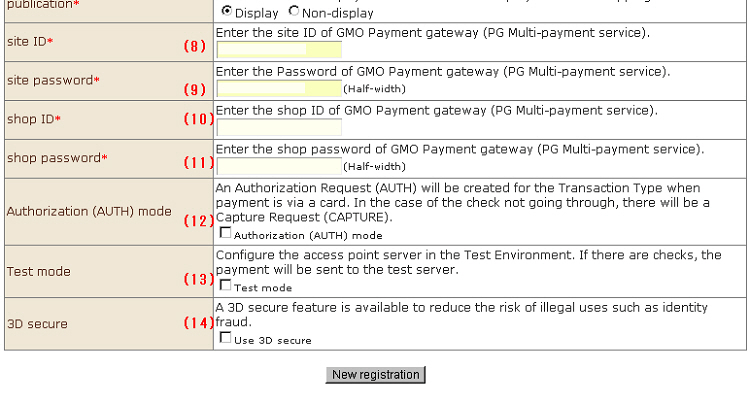
* Steps (1) to (7) of the setting method are the same as those for PayPal.
(8) Site ID
(9) Site password
(10) Shop ID
(11) Shop password
(8) to (11) are provided from the GMO Payment gateway (MOD-I). Enter the provided information.
(12) Provisional sales (AUTH) mode
When this item is selected, the data send type (processing category) is set to provisional sales (AUTH) at settlement. If this item is not selected, the data send type (processing category) immediately becomes sales (CAPTURE).
※ Process the actual sales record after sending provisional sales to the GMO Payment gateway (MOD-I) (PG multi payment) management screen.
※ A contract with GMO Payment gateway (MOD-I) must be concluded beforehand. Note that this function will not operate properly if the details input do not match the contract details.
(13) Test Mode
When this item is selected, the connection destination at settlement becomes a test environment for the GMO Payment gateway (MOD-I) (PG multi payment). If this item is not selected, the actual environment is connected to.
※ In the test environment, be sure to enter "8. Site ID to 11. Shop password" for the test environment.
※ In the test environment, be sure to perform the test using the card No. for the test.
(14) 3D secure
When "Use 3D secure" is selected, the 3D secure function for reducing the risk of illegal use is enabled.
※ A contract with GMO Payment gateway (MOD-I) must be concluded beforehand. Note that this function will not operate properly if the details input do not match the contract details.
※ Operation of 3D secure cannot be confirmed in the GMO Payment gateway (MOD-I) development environment or with the test card.
3. Click the [New Registration] button to complete registration.