
When packages are divided into two or more small lots by shipment timing, temperature zone, package inclusion restrictions, etc., shipment information can be registered by individual shipments.
1. The information of individual small lot shipments is displayed at "Shipment (Shipping) Status" on the "Order Management: Verify order details" screen.Clickthe [Setting] button. The "Order Management: Register Shipment (Shipping)" screen will be displayed.
2. Register the shipment information on the "Order Management: Register Shipment (Shipping)" screen.
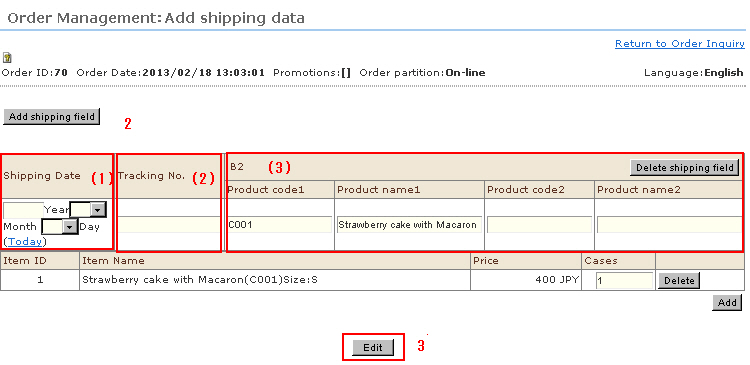
(1) Shipment Date: Enter the shipment date for each small lot.
(2) Shipment tracking number: Enter the shipment date for each small lot.The shipment data and package tracking number will be listed in the shipment notice e-mail.
(3) For B2 data (ItemCd 1/2, ItemNm 1/2): These are output as the item name when data is output to the YAMATO TRANSPORT invoicing system B2.By default, item code 1 and the item name of the 1st and 2nd registered products are output in the breakdown by individual small lots.Set whether to use these items or use the store's item codes/item names at shipment in the Shipping Method Settings.
3. Click the [Edit] button.
4. Click [OK] in the confirmation message. The shipment information will be saved, and the display will return to "Order Management: Verify order details" screen.Confirm that the shipment date and package tracking number have been added to the "Shipment (Shipping) Information" field.
