This function allows you to use the points program at the store's discretion as a mechanism for encouraging repeat purchasing.
This registers some of the amount spent for shipping as points which are allocated as part of payment for goods in shopping later on.
1. Points added at purchase of goods are added to "Unvalidated points" at the time of purchase.
By the store user editing "Unvalidated points" to official "points", the points holder can use the points as part of actual payment for goods during shopping.
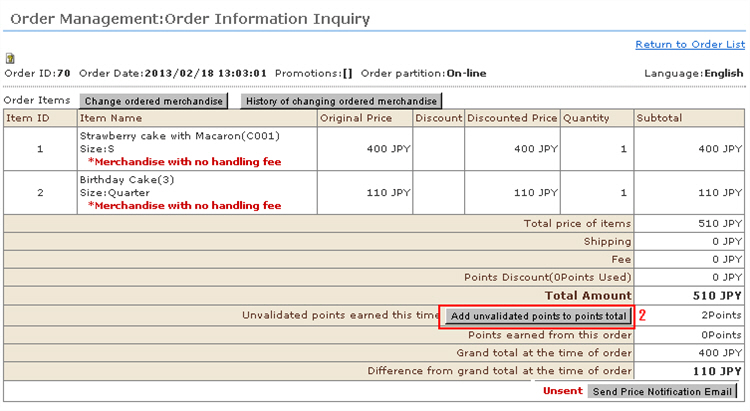
2. When the transaction with the customer is completed and processing has reached the stage where points may be added, click the [Add unvalidated points to points total] button.
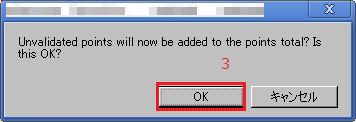
3. The confirmation message will appear. Click [OK].
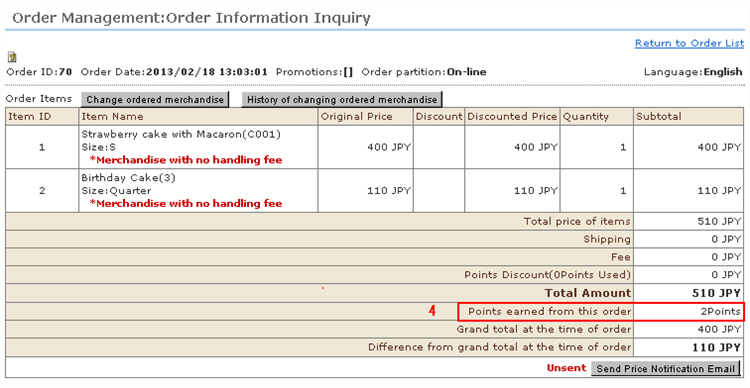
4. The unvalidated points are added to the official points.
※ Once unvalidated points have been added to official points, the points cannot be reverted to unvalidated points.
※ To correct the points of each individual member after they have been added to official points, do so as in regular operations at "Batch Edit Points" or "Member Management".