Procedure
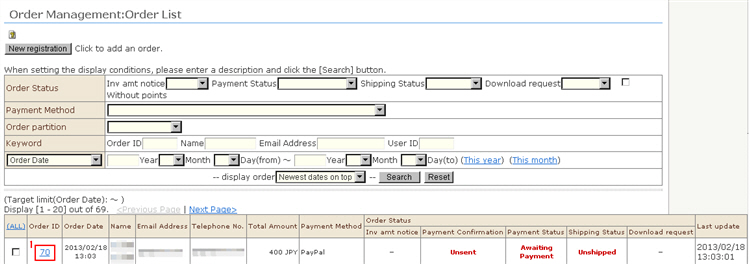
1. Click the receipt number you want to confirm/edit from the list. The "Order Management: Verify order details" screen will be displayed.
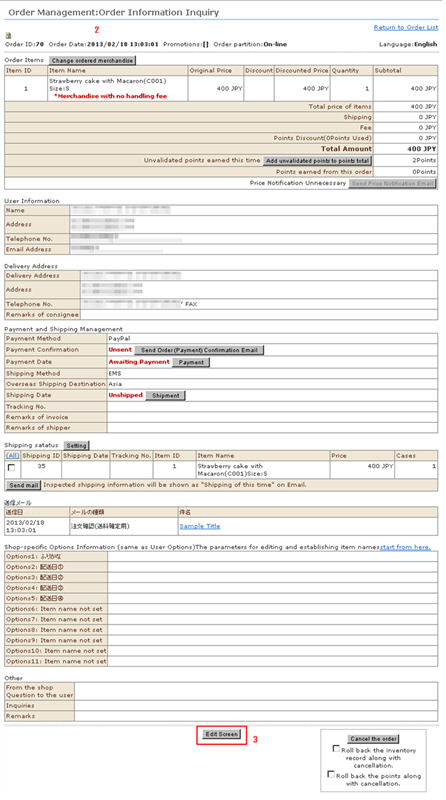
2. You can confirm the details of the received order, orderer information, shipping destination, and other details.
3. Editing details of received orders
Click the [Edit Screen] button at the bottom of the screen. The "Edit Order Details screen will be displayed.
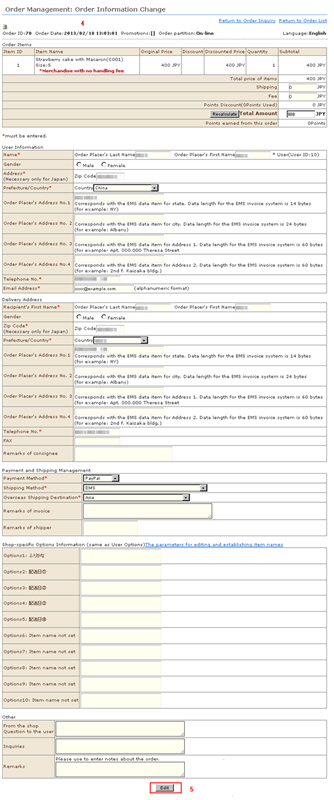
4. Correct the details of the received order.
<Editing ordered product>
Ordered products cannot be edited in this screen.
Return to the "Order Management: Verify order details" screen, and edit the details by clicking the [Edit ordered product] button.
<Cautions when editing the shipping destination>
Care is required when a shipping destination country is edited since the shipping fee will sometimes be different.
Since the shipping fee is not automatically edited by the system, manually enter the correct shipping for the country when the shipping destination has been changed.
<Cautions when editing the shipping method>
Since the commission is not automatically edited by the system, manually enter the correct commission when the shipping method has been changed.
5. Click the [Edit] button to complete editing.