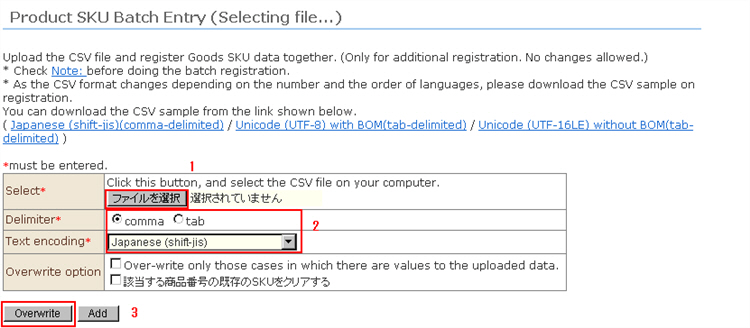
Batch register SKU information for products.Product information must be registered beforehand.
You can upload a CSV file to batch register "product SKU data."
* Before performing a batch registration, be sure to check the "Precautions" linked from the management screen.
* The format of each CSV file changes with each individual store according to the number and sort order of supported languages. When creating a CSV file, download the CSV sample file from the management screen.
1. Select the file.
2. Select the delimiter character and character encoding to suit the content of the file you created.
※ Note: Select not the "format of the downloaded file" but the format of the actually saved CSV file. For example, when downloading a CSV sample file in the format "Japanese(shift-jis)(comma delimiter)" and enter Chinese, etc. in an Excel file and save it in "Unicode text" format, the file will be saved as "Unicode(UTF-16LE) with BOM" and "tab delimiter".
3. Click the [Confirm] button. The file is uploaded and is checked.
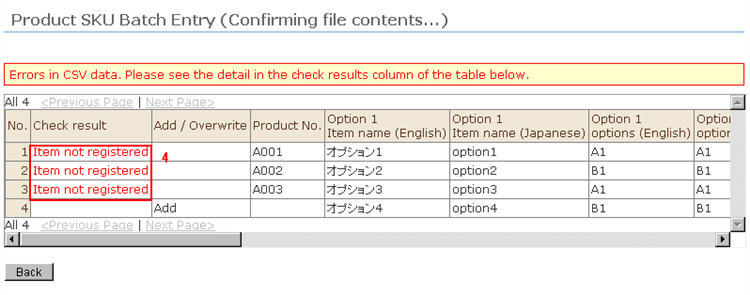
4. If a problem is found in the content of the data, error details will be displayed in the "Check Result" field.
Referring to the error details, correct the CSV file. Click the [Back] button, and repeat steps 2 and 3 until the error no longer appears.
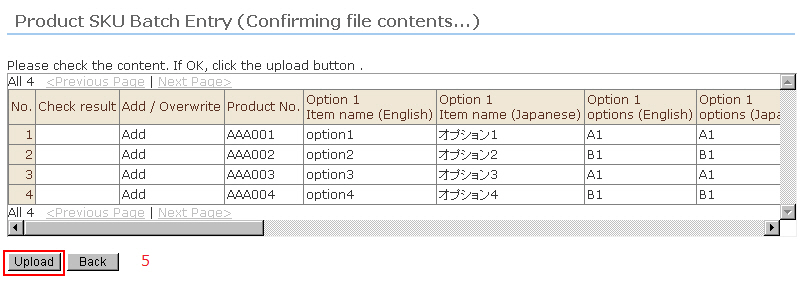
5. If the content of the data can be imported, the [Upload] button is displayed between the list of items scheduled to be registered.
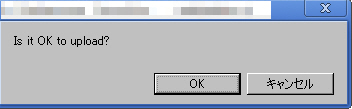
6. When the [Upload image files] button is clicked, the upload is completed and the result is displayed.