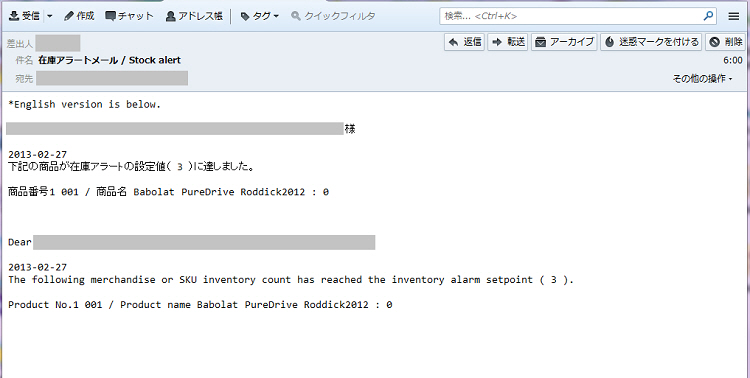
When the assigned product quantity in stock becomes less than a fixed value, an alert notifying that the assigned quantity is stock is low can be sent to the user's e-mail address.
・ Alerts are sent at a frequency of once a day at 06:00 a.m. (Japan time)
・ Alerts are sent to the account user e-mail address.
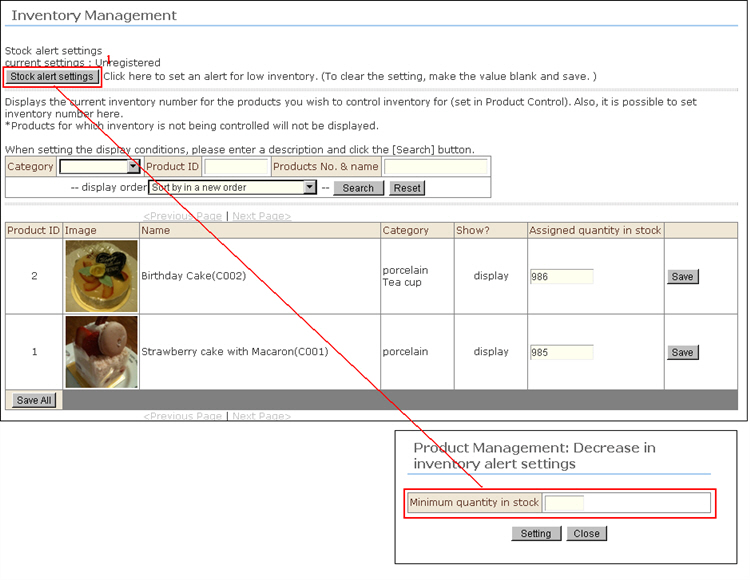
1. Click the [Stock alert settings] button. The window for entering the minimum assigned quantity in stock will be displayed.
2. Enter the minimum assigned quantity in stock to be used as the standard for alerts, and click the [Setting] button.
※ To cancel a setting, enter a blank space for the setting value.
3. The alert is set.
4. When a stock alert mail has been set, notification of stock information will be made according to the e-mail below.For products that are managed by item inventory management, stock information is notified in individual item units, and for products that are managed by SKU inventory management, stock information is notified in individual SKU units.