Content made with the content management function can be classified into one layer of categories.
Content categories, like product categories, can be listed in almost store screens.
Procedure
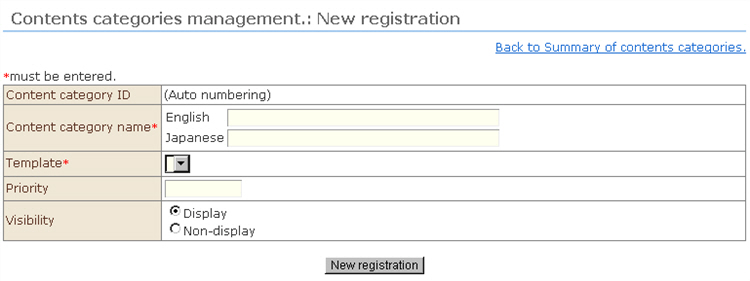
1. Click "Add content-category" from the menu. The "Contents Categories Management: New Registration" screen opens.
2. Enter the category details.
1) "Content category name": This is the category name that is actually displayed in the shop screen.
2) Template: The template whose type is assigned as "content category" at "Contents Templates Management" is displayed. Select the template to be used with this content category.
3) Priority: Sets the sort order of content categories in the content category list. Small numbers are sorted higher up. When content categories have the same number, categories having an older registration date sorted downwards.
4) Visibility: Set whether or not to display this category. When Hide is set, all content belonging to this category is hidden.
3. Click the [New Registration] button. The categories are saved.