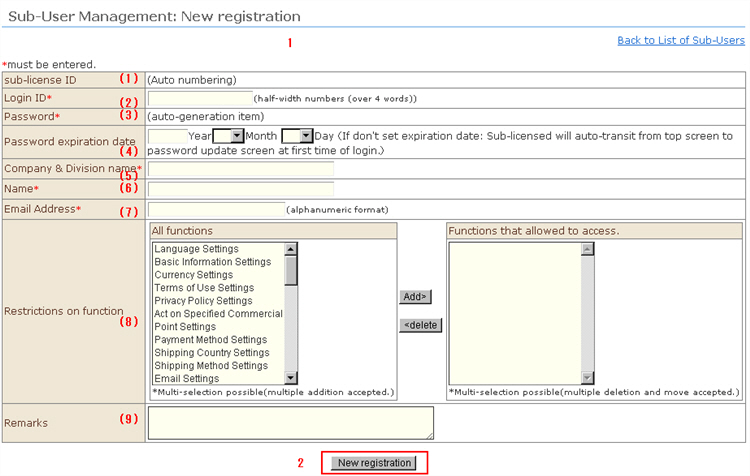
1. Enter the sub-user information.
(1) Sub-User ID (automatically assigned)
(2) Set the login ID.
(3) Set the password.
(4) A password expiration date can be set. (entry optional)
When the expiration date is not set, the screen will move to changing of the password during login.
(5) Register the name of the company and department in use.
(6) Register the name of the person in charge.
(7) Register the e-mail address of the person in charge.
(8) You can set items that sub users can perform tasks on. Select the items that the sub-user will be allowed to access from the "All functions" field on the left, and click the [Add] button. Those items will move to "Accessible functions" field. Only items that have moved to the "Accessible functions" field will be displayed in the sub-user management screen.
(9) Remarks can be entered.
2. Click the [New registration] button to complete registration.