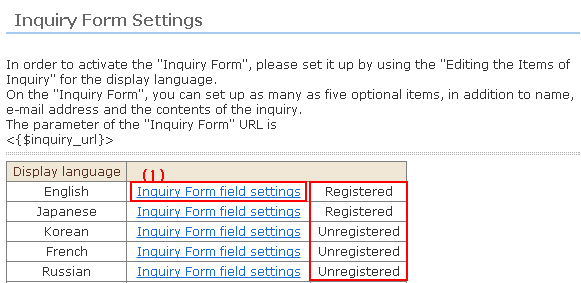
※ To enable an inquiry form, set at "Inquiry Form field settings" for each display language. "Unset" languages are disabled.
1. Click [Inquiry Form field settings].
2. By default, each of the items in the inquiry form - name, e-mail address and inquiry details (text area) - are displayed in the store screen. So, set the display phrases for each item.
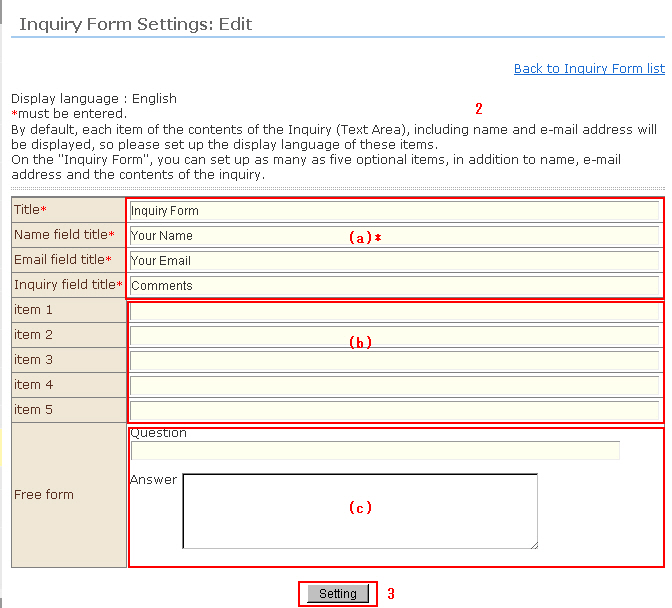
(a) Enter the names of required input items. "form title", "name field", "e-mail address field", "inquiry details field"
(b) Enter the inquiry items. Up to any five items can be set. When left blank, "Inquiry items 1 to 5" are not created.
(c) Enter free-format items. You can also set sample replies at the reply section.
3. 3. Click the [Setting] button.
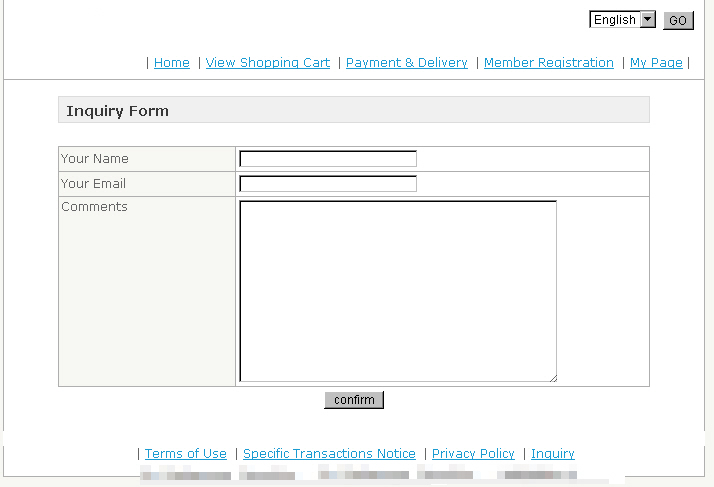
4. Let's confirm the shop inquiry page.
When an inquiry comes in, an e-mail with the inquiry content is distributed from the system to e-mail addresses set in the store's contract information.
An automatic reply is sent to the person who made the inquiry using the "inquiry" template in mail management.
Hint: The template variable for the inquiry form URL is <{$inquiry_url}>.
Paste as follows to the template of the desired link destination page:
(Example)
<a href="<{$inquiry_url}>">Inquiry</a>