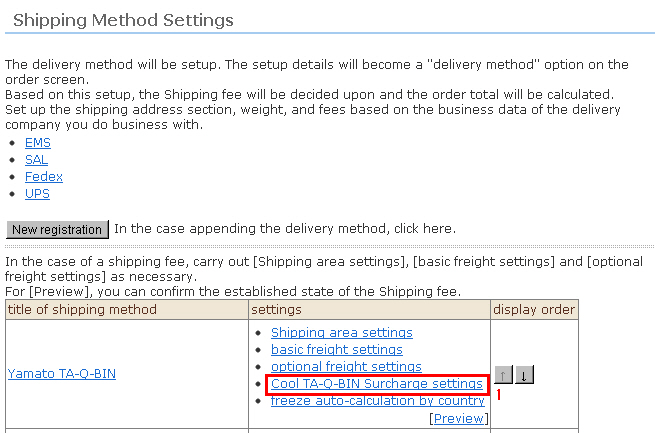
The cool TA-Q-BIN surcharge can be additionally set only when "Shipping methods" is set to "YAMATO TRANSPORT" in the "Shipping Method Settings". The cool TA-Q-BIN surcharge is added to the shipping fee when products specified with a "frozen" or "cold storage" temperature zone are purchased.
Procedure
1. Select "Cool TA-Q-BIN Surcharge settings" from the shipping method list at "Shipping Method Settings".
※ This item is not displayed when "Shipping methods" is other than "YAMATO TRANSPORT".
2. The "Cool TA-Q-BIN Surcharge settings" sub-window is displayed. Enter the Cool TA-Q-BIN settings.
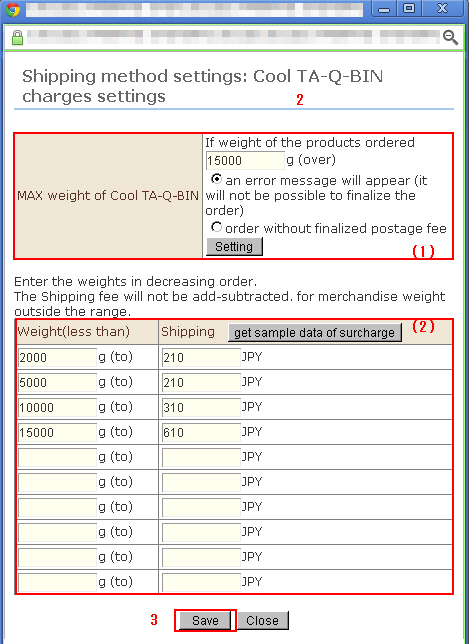
(1) MAX weight of Cool TA-Q-BIN
Enter the maximum weight that can be accepted by the Cool TA-Q-BIN service. Note that the maximum weight that can be accepted is sometimes smaller than room temperature products.
(2) Weight range (or below only)/freight of Cool TA-Q-BIN
Enter the weight designation and surcharge to be charged in the case of that weight range. The customer will actually be billed based on this tariff.
For (1) and (2), you can also set the maximum weight and sample surcharge categories for Cool TA-Q-BIN corresponding to the base country by clicking "Get sample data of surcharge".
3. Click the [Save] button to complete setting.