Setting the basic freight (packing material, commission, insurance, etc.)
<Supplementary explanation regarding shipping free (basic freight and optional shipping fee)>
First set the shipping fee (basic freight) for each individual region, and set the shipping fee (optional shipping fee) based on amount of product and weight. The extra shipping fee will be added on.
[Calculation formula]
Shipping fee = Basic freight + optional shipping fee (by amount of products) + optional shipping fee (by weight of products)
* When the basic shipping fee is not set, it is assumed to be "0".
* The amount and weight of products in a range to which the optional shipping fee is not set will not be calculated.
* When setting the shipping fee based on the weight of products, be sure to enter the weight, too, when registering the products.
Procedure
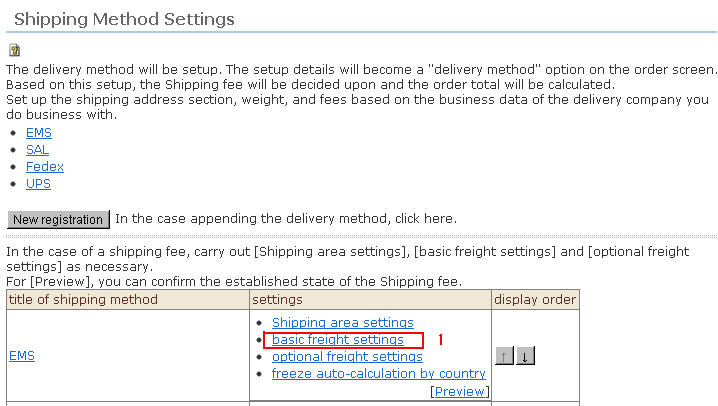
1. Click [Basic freight settings] from the Shipping Method Settings top screen.
2. Enter the basic freight for each individual region.
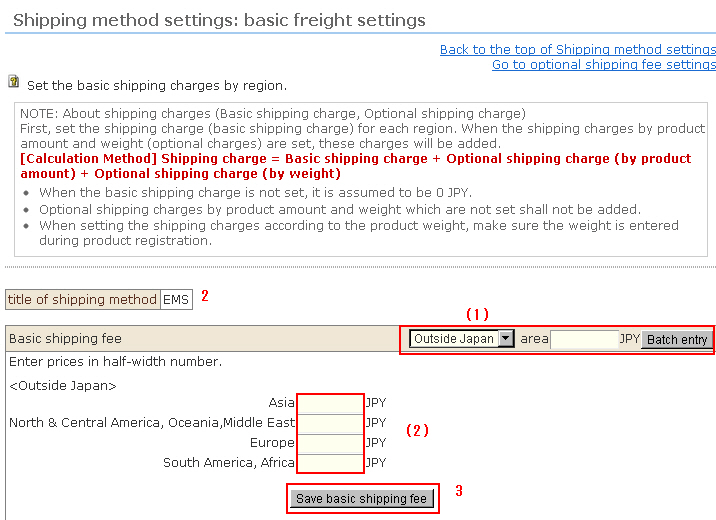
(1) To batch enter the basic freight, select by the pulldown menu, enter the amount, and click [Batch entry].
(2) To set the basic freight individually, enter individually.
3. When input is finished, click the [Save basic shipping fee] button.