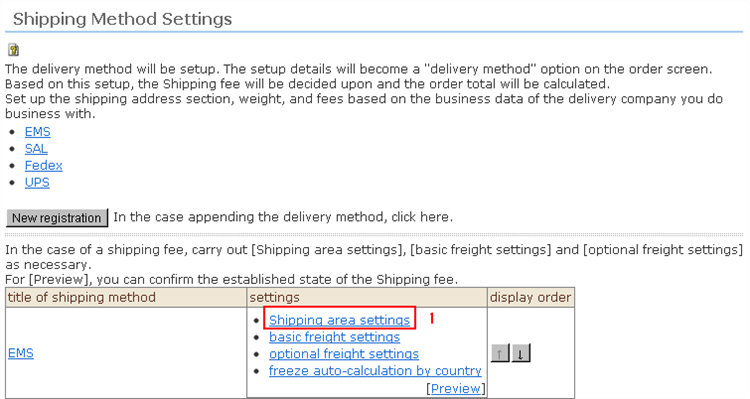
Set the overseas areas where shipping is available. (Shipping fees can be set in units of these areas.) )
Procedure
1. Click [Shipping area settings] from the Shipping Method Settings top screen.
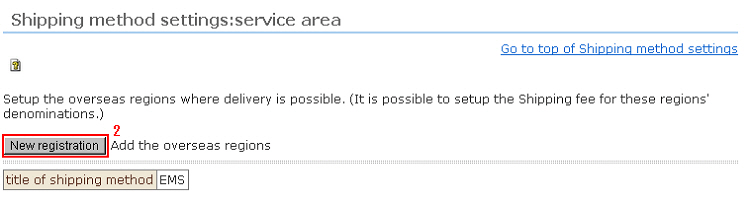
2. The shipping area list page is displayed. Set the overseas areas where shipping is available.
Click [New Registration] from the top screen.
3. The new registration page for the overseas area is displayed. Enter the items for the overseas area.
[*] indicates required items.
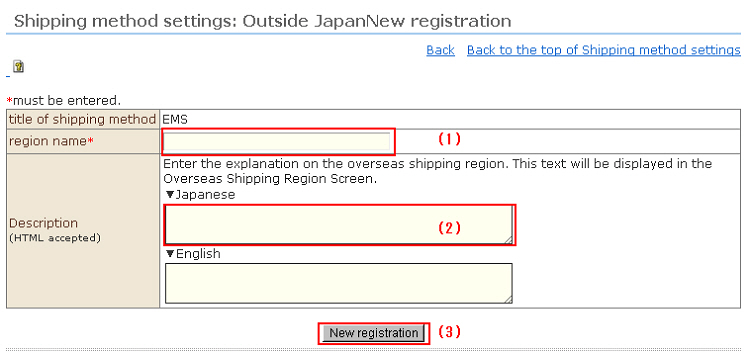
(1) Region name*
* This category name is displayed on the payment/shipping fee screen. Note that only one region name will be applied in all languages.
(2) Description (HTML supported)
Enter a description about overseas shipping areas in each language. This description is displayed in the "Overseas Shipping Area" screen.
(3) When input is finished, click the [New registration] button.