Available with this system is a member system where customers can register to receive various benefits.
With Point Settings, you can set whether or not to use point functions in the member system and make more detailed settings.
Procedure
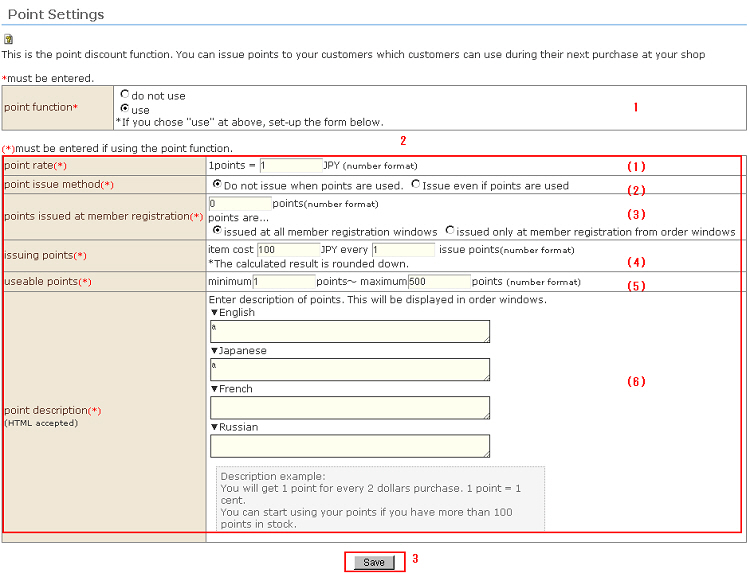
1. Set whether or not to use the point functions.
When "use" is selected, detailed settings are carried out.
When "do not use" is selected, there is no need to input the following:
For issued points, retained points are displayed in the customer's order input screen (payment/shipping method selection screen).
2. Set up the point functions in more detail.
* Only when "use" is set for the point functions
(1) Point rate
Set the standard sum for determining how much a point is worth when points are redeemed.
(2) Point issue method
Set whether or not to issue points when points are used.
(3) Points issued at member registration
Set the number of points to issue when a customer is registered as a member.
Besides the "Member Registration" screen, customers can also register as members when shopping from the "Order" screen.
(4) Issuing points
Set the number of issued points.
* Figures past the decimal point after calculation are rounded down.
(5) Useable points
Set the minimum and maximum number of points that can be used at a single time when points are redeemed.
(6) Point description
Enter a description about use of points in each language. (HTML supported)
These details are displayed in the customer's order input screen (payment/shipping method selection screen).
3. Click the [Save] button. This saves the details you have entered.