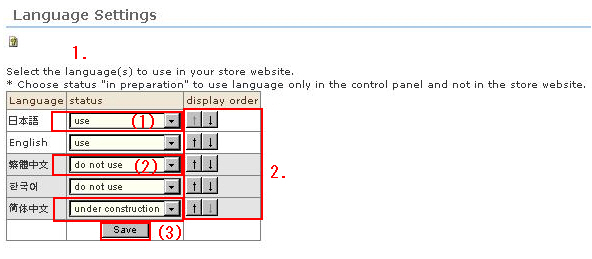
The language will be displayed in accordance with your contract. Set the screen display language and display order priority.
Procedure
1. You can change the display status of pages by individual language.
(1) Display the desired language by selecting the [use] button.
(2) Selecting [do not use] hides that respective language (i.e. input items do not appear even in the management screen).
(3) Selecting the [under construction] button also hides the respective language. (Input items appear in the management screen, and entry and preview are possible.)
2. Set the display order.
Languages are displayed in order of preference from the top down. Click the [↓][↑] buttons to change the sort order. The topmost language is displayed first when the shop is accessed.
3. When you have finished the setting, click the [Save] button. This saves the details you have entered.
* Even if [use] is set for a display language, shops will not be displayed in that language unless the design template for that language is set.
For example, to display "Japanese and " English", two templates- "Japanese" and "English"- are required.