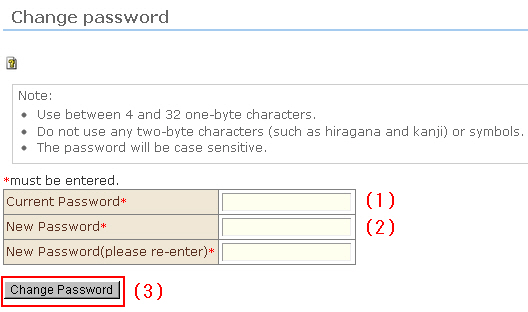
You can change the login password. After an initial login, the Password Edit screen is automatically displayed.
Passwords are valid for six months. To ensure secure online shopping, we recommend periodically changing passwords.
●Tips when creating passwords●
・ Set a password using 4 to 32 1-byte alphanumeric characters.
・ Do not use 2-byte characters (2-byte characters such as "A" or "1", and Chinese characters) or symbols.
・ Entry of alphabet characters is case-sensitive.
Procedure
(1) Enter the current password.
(2) Enter the new password twice.
(3) Click the [Change Password] button. The password is changed. At the next login, log in with the new password.